Dragonfly Frame SVG Bundle: A Practical Guide to Choosing and Using Elegant Vector Art
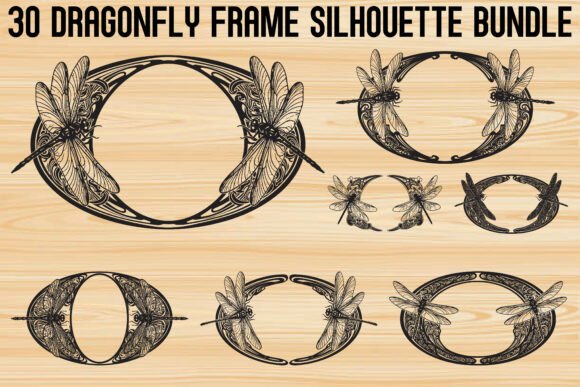
When you are searching for digital assets that blend natural beauty with structural elegance, the Dragonfly Frame SVG Bundle stands out as a versatile resource. This collection features thirty distinct designs where dragonflies form circular and oval frames, showcasing intricate wing and body details. However, simply downloading these files is only the first step. Many creators, from hobbyists to small business owners, encounter avoidable pitfalls when integrating such specific vector artwork into their projects. Understanding the nuances of file formats, cutting settings, and design application can mean the difference between a professional-quality product and a frustrating waste of materials.
Understanding the Value of Intricate Vector Frames
The appeal of this bundle lies in its dual nature. Dragonflies symbolize transformation, freedom, and harmony, while the decorative frames add sophistication and balance. This makes them ideal for wedding invitations, fantasy artwork, posters, logos, rustic décor, and handmade gifts. Yet, the complexity that makes these designs beautiful also makes them demanding. Each design blends natural beauty with ornamental artistry, creating versatile and stylish vector artwork. If you treat these files like simple block letters or basic shapes, you will likely face issues during the cutting or printing process.
Before you begin, it is crucial to recognize that these are not just images; they are precise mathematical paths. The included formats—SVG, PNG, JPG, PDF, EPS, and AI—serve different purposes. A common mistake is assuming all formats are interchangeable for every machine. For instance, using a high-resolution JPG for a vinyl decal might seem convenient, but it lacks the scalability and clean edges of an SVG. This oversight can lead to pixelated edges on large prints or failed cuts on laser machines.
Common Mistakes in File Selection and Preparation
One of the most frequent errors users make is ignoring the specific requirements of their cutting machine. Whether you are using a Cricut, Silhouette Cameo, or a laser cutter, the software interprets vector data differently. Users often open the SVG files directly without checking for stray nodes or overlapping paths. While the Dragonfly Frame SVG Bundle provides clean, scalable, and cut-ready vector graphics, minor adjustments are sometimes necessary depending on your software version.
- Ignoring Material Thickness: When cutting intricate dragonfly wings from cardstock or vinyl, failing to account for material thickness can cause tears. The delicate connections in the frame require precise pressure settings.
- Wrong Format for the Job: Using PNG files for cutting instead of SVGs removes the ability to scale without quality loss. Always use the SVG, EPS, or AI files for any project requiring resizing.
- Overlooking Weedability: For vinyl decals, if the gaps between the dragonfly’s wings are too small for your weeding tool, the design becomes unusable. Always preview the design at actual size before cutting.
To avoid these issues, always perform a test cut on scrap material. This simple step saves time and expensive vinyl or paper. Additionally, familiarize yourself with the "weld" or "union" functions in your design software. Combining overlapping elements ensures that the cutter treats the frame as a single continuous path rather than multiple disjointed pieces, which significantly improves the structural integrity of the final product.
Design Application and Aesthetic Balance
Beyond technical execution, there is the matter of aesthetic application. A common misunderstanding is that these frames must always be used as borders. While they are perfect for framing text in wedding invitations or quotes for wall art, they can also serve as standalone motifs. Placing a dragonfly frame over a solid background color can create a striking logo element, while layering it over a textured paper adds depth to scrapbooking pages.
However, clutter is the enemy of elegance. Because the designs feature intricate wing and body details, pairing them with overly busy backgrounds or complex fonts can diminish their impact. A better approach is to let the dragonfly frame breathe. Use ample white space around the design. If you are creating a t-shirt design, consider placing the frame on the upper back or sleeve rather than centering a large, detailed image on the chest, where fabric stretching might distort the fine lines.
For those using these assets for laser cutting, material choice is critical. Wood veneer or acrylic works beautifully, but the power settings must be calibrated to prevent charring the delicate edges. The Dragonfly Frame Silhouette Bundle is designed for precision, so your machine settings should reflect that. Start with lower power and higher speed, adjusting incrementally until you achieve a clean cut without burn marks.
Maximizing Versatility Across Projects
The versatility of this bundle extends beyond physical crafts. Digital marketers and bloggers can utilize the transparent PNG files for website headers, social media graphics, or email newsletters. The key here is resolution. Ensure you are using the high-resolution PNGs provided to maintain clarity on retina displays. A blurry image can undermine the perceived professionalism of your brand.
For educators and freelancers, these vectors can be integrated into presentations or educational materials about nature, biology, or art history. The symbolic meaning of dragonflies—transformation and harmony—can reinforce thematic messages in workshops or seminars. When using the PDF or JPG files for printables, always check the print settings to ensure "actual size" is selected, preventing unintended scaling that could misalign pre-printed templates.
What to Check Before You Begin
Before committing to a large production run or a final client deliverable, take a moment to evaluate your workflow. Verify that your software supports the file format you have chosen. Most modern cutting machines handle SVGs well, but older versions may require DXF conversions. Check the license terms if you are selling products made with these designs. While most bundles allow for commercial use, it is always wise to confirm the specific permissions regarding mass production or digital resale.
Additionally, organize your files. With thirty different designs, keeping track of which frame suits which project can become chaotic. Create a visual catalog or thumbnail sheet. This simple organizational step enhances efficiency and allows you to quickly locate the perfect design for urgent deadlines.
In conclusion, the Dragonfly Frame SVG Bundle offers a rich resource for creators who value detail and symbolism. By avoiding common technical mistakes, respecting the intricacy of the designs, and applying them with aesthetic sensitivity, you can produce high-quality, professional results. Whether you are crafting a heartfelt gift, designing a brand identity, or decorating your home, these vector graphics provide the foundation for elegant and meaningful creations. Take the time to understand your tools and materials, and let the natural beauty of the dragonfly enhance your artistic vision.