Mastering the Floral Teardrop Earring Laser Cut Design for Professional Results
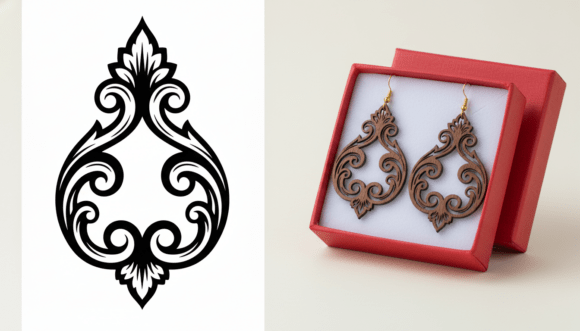
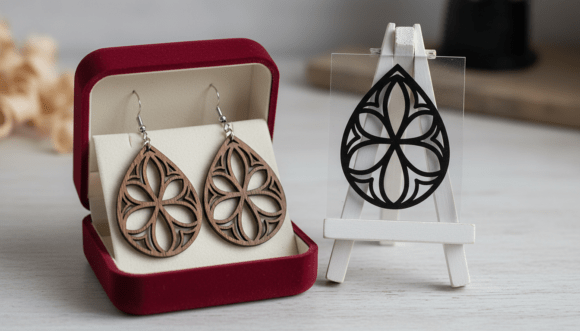
Creating handmade jewelry that stands out in a saturated market requires more than just access to a laser cutter; it demands precision, aesthetic balance, and technical foresight. The Floral Teardrop Earring Laser Cut Design has become a staple for creators looking to blend organic beauty with geometric precision. This specific style features a drop shape filled with a symmetrical floral pattern, effectively merging nature-inspired motifs with clean, modern lines. However, many artisans rush into production without fully understanding the nuances of the file or the material constraints, leading to wasted resources and subpar products.
Whether you are using a Glowforge, xTool, OMTech, or another CNC system, the difference between a bestseller and a scrap bin item often lies in the details. This guide explores common pitfalls when working with decorative mandala SVGs and provides actionable advice to ensure your final product is elegant, durable, and ready for sale.
Understanding the Design Structure
Before sending any file to your machine, it is crucial to understand what makes this design unique. Unlike simple solid shapes, the Floral Teardrop Earring Laser Cut Design relies on negative space. The intricate floral mandala pattern creates visual interest by removing material rather than adding it. This approach reduces weight, making the earrings comfortable for all-day wear, but it also introduces structural vulnerabilities if not handled correctly.
The teardrop shape itself is universally flattering, elongating the neck and drawing attention to the face. When combined with a symmetrical floral interior, the result is a piece that feels both traditional and contemporary. However, the complexity of the internal cuts means that your laser settings must be dialed in perfectly. A slight deviation in power or speed can cause charring, incomplete cuts, or fragile pieces that break during assembly.
Common Mistakes and How to Avoid Them
Many beginners and even experienced makers overlook critical steps when working with complex vector files. Here are the most frequent errors and how to correct them.
Ignoring Material Thickness and Kerf
One of the most significant mistakes is assuming that a design will look the same regardless of the material thickness. A floral teardrop design optimized for 3mm acrylic may look cluttered or fragile when cut from 6mm wood. The "kerf," or the width of the material removed by the laser beam, also affects the fit of any assembled parts. If your design includes multiple layers or hanging components, failing to account for kerf can result in pieces that are too tight or too loose.
Better Approach: Always test cut a small section of the design on your chosen material. Adjust your design scale if necessary to maintain structural integrity. For thicker materials, consider simplifying the inner floral details to prevent excessive burn time and heat buildup.
Overlooking Vector Cleanliness
Not all SVG files are created equal. Some downloadable designs contain redundant nodes, open paths, or overlapping lines that confuse laser software. This can lead to the laser head making unnecessary passes, increasing production time and risking uneven cuts. A messy vector file can also cause the laser to pause or stutter, leaving visible marks on the material.
Better Approach: Use the included EPS or SVG files to inspect the vector paths in software like Adobe Illustrator or Inkscape. Ensure all paths are closed and remove any duplicate lines. The high-quality vector artwork provided in this package is designed with clean lines for accurate laser cutting, but a quick pre-flight check never hurts.
Neglecting Post-Processing Requirements
Laser cutting is only half the battle. Many creators forget to factor in the time and effort required for post-processing. Intricate floral patterns can trap smoke residue, requiring thorough cleaning. Additionally, sharp edges on acrylic or splintered edges on wood need sanding or polishing to ensure the jewelry is safe and comfortable to wear.
Better Approach: Include post-processing time in your pricing and production schedule. Keep appropriate cleaning supplies on hand, such as microfiber cloths for acrylic or fine-grit sandpaper for wood. Consider applying a sealant to wooden earrings to enhance durability and protect the intricate details.
Choosing the Right File Format
The package includes four high-quality file formats: DXF, EPS, SVG, and PDF. Selecting the right one for your workflow is essential for efficiency.
- DXF: Best for users operating CNC machines or older laser software that prefers CAD-based inputs. It ensures compatibility with industrial-grade systems.
- EPS: Ideal for designers who want to edit the vector paths before cutting. You can adjust the thickness of lines, modify the floral elements, or resize the design without losing quality.
- SVG: The go-to format for modern desktop laser cutters like Glowforge and xTool. It is ready to use and preserves the scalability of the vector artwork.
- PDF: Useful for previewing the design or printing templates for manual crafting, though not suitable for direct laser cutting.
Using the wrong format can lead to import errors or loss of detail. Always match the file type to your specific machine’s requirements to streamline your workflow.
Maximizing Commercial Viability
If you plan to sell earrings made from this Floral Teardrop Earring Laser Cut Design, consider the broader market appeal. The balanced and eye-catching look of the mandala pattern appeals to a wide demographic, from wedding guests to everyday fashion enthusiasts. However, differentiation is key.
Experiment with material combinations. Pair a wooden base with an acrylic overlay for a mixed-media look. Use contrasting colors to highlight the floral details. Additionally, consider offering customization options, such as engraving initials on the back of the teardrop shape. These small touches can increase perceived value and justify higher price points.
Remember that this is a digital download only; no physical item will be shipped. This means your success depends entirely on your execution. Invest time in mastering your machine, refining your finishing techniques, and presenting your final product professionally. High-quality photography and clear descriptions of the materials used will help communicate the craftsmanship involved.
Final Checks Before Cutting
Before you commit to a full batch of production, run through this checklist:
- Verify the file integrity by opening it in your preferred design software.
- Confirm the dimensions match your desired earring size, typically between 40mm and 60mm in length for comfort.
- Perform a test cut on a scrap piece of the same material to dial in power and speed settings.
- Inspect the test piece for charring, incomplete cuts, or structural weakness.
- Plan your assembly method, ensuring you have the necessary jump rings, earring hooks, and adhesives ready.
By approaching the Floral Teardrop Earring Laser Cut Design with patience and attention to detail, you can create stunning, professional-grade jewelry that resonates with customers. Avoid the common traps of rushed production and poor file management, and focus on delivering a polished, high-quality product that showcases the beauty of laser-cut craftsmanship.